How to update my account details
This article outlines how to update your address, email address and phone number on your account.
1. You can update your email address on your account here:
2. Click on 'Edit' on the right-hand side next to your name. 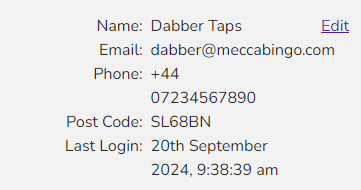
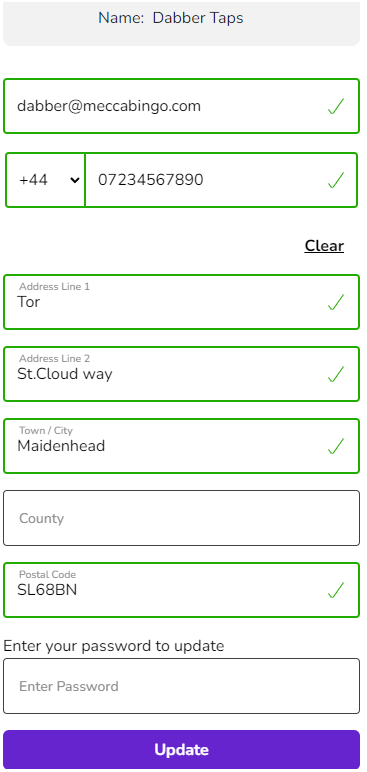
3. Enter the new details, enter your password and click Update.
1. You can update your email address on your account here:
2. Click on 'Edit' on the right-hand side next to your name.
3. Enter the new details, enter your password and click Update.
Related Articles
Close my account
This article outlines how to close your account. How to Close Your Account: If you'd like to close your account and have no concerns about your gambling, please contact us by clicking the 'Chat with an Expert' button at the bottom of this page. Hints ...Register an account
This article outlines how to sign up for a Mecca Bingo account. New Player Sign Up? If you're a new member, you can sign up here: JOIN Club Member Sign Up? 1. If you're already a member of one of our Mecca Bingo Clubs, you can sign up with your ...How do I verify my account
This article outlines how to verify your account. Are you a new customer? As per UK regulations, we must verify all accounts. If you've just signed up and we require some information from you, you'll see the screen below, just click on continue and ...I can't log in or access my account
This article outlines the reasons why you may be having issues logging into your account and how you can resolve them. Troubleshooting Steps: 1. Correct Details: Double-check your username and password for errors. Make sure there are no extra spaces ...Why am I being asked to verify my account
This article outlines the reasons why we need to verify customer accounts. We need to verify your account information to comply with the UK Gambling Commission's regulations and keep everyone safe. It's a standard process that helps us: • Prevent ...